- Sep 8, 2025
⚡️ JSON Prompting in VEO3: The Evolution Toward Precise AI-Video Creation ⚡️
- Francesca Fini
- MICRO-TUTORIALS
- 0 comments
Free-form prompts can feel like rolling dice: sometimes you strike gold with a masterpiece, other times you get an output that barely resembles what you envisioned. That’s because natural language is open-ended—words like dramatic, cinematic, or epic are full of nuance, and the AI’s interpretation may not always align with yours.
But what if you could hand VEO3 a blueprint, not just a wish list? Instead of hoping the system reads between the lines, you’d be providing a structured set of instructions that lock down the essentials: the scene, the camera movement, the lighting mood, even the soundtrack.
That’s the promise of JSON prompting—turning loose descriptions into precise data points. With JSON, VEO3 stops guessing what you meant and starts executing what you specified. For creators, this means fewer surprises, faster iteration, and outputs that stay faithful to the original vision.
JSON vs. Regular Prompting: A Side-by-Side Test
To really see the difference, I ran a comparison test. I started with a highly detailed image created in MidJourney: a punk biker crossing a decaying futuristic city in broad daylight. From there, I generated two videos in VEO3—one using a traditional detailed text prompt, the other by restructuring that same prompt into JSON format.
The results were telling. The video created from the regular prompt was perfectly valid: the city felt alive, the biker looked convincing, and the overall mood aligned with the description. But the version generated with the JSON prompt was on another level—more dynamic, richer in detail, and strikingly faithful to every element I had specified.
The most surprising detail? Both prompts included mention of a rearview mirror, a feature absent from the original MidJourney image. The text-based prompt ignored it, defaulting to the visual reference. But the JSON prompt delivered: the mirror appeared, seamlessly integrated into the motorcycle’s design. It’s a small detail, but a powerful demonstration of how structured prompts push VEO3 to honor your creative intent more faithfully than free-form descriptions ever could.
TRADITIONAL PROMPT:
A punk biker with a red mohawk, wearing a spiked leather jacket and studded black pants, tears down a sun-scorched futuristic highway on a turbo-charged motorcycle, engines roaring. Shot with a push-pull dolly zoom from behind using an ARRI ALEXA MINI LF paired with an anamorphic lens, the perspective warps as the background stretches while the rider remains sharply in focus, heightening the sensation of breakneck speed and adrenaline. Dust explodes beneath the tires, heatwaves ripple off the asphalt, and the sprawling skyline of cyberpunk megastructures looms ahead, blurred by speed. Palms sway violently in the periphery, other vehicles streak by in the distance, and the shimmering road pulses with kinetic heat distortion. Subtle micro-movements: the rider's leather creaks with motion, their eyes scan via side mirrors, fingers twitch over the throttle, jacket flutters violently in the wind. Color grading leans into gritty amber tones, hard shadows and desaturated midtones, evoking a neo-noir desert chase. Visual effects: heat shimmer, chromatic aberration, motion blur, and anamorphic warping intensify the surreal velocity.
JSON PROMPT:
{
"shot_type": "push-pull dolly zoom from behind",
"camera": {
"model": "ARRI ALEXA MINI LF",
"lens": "Anamorphic lens"
},
"angle": "low angle behind subject",
"subject": {
"description": "Punk biker with a red mohawk, spiked leather jacket, and studded black pants riding a turbo-charged motorcycle",
"actions": [
"accelerating at high speed",
"jacket fluttering in the wind",
"fingers twitch over the throttle",
"eyes scan via side mirrors"
],
"micro_movements": [
"leather creaks with motion",
"subtle body shifts",
"hair affected by wind"
]
},
"environment": {
"setting": "futuristic desert highway with cyberpunk skyline in background",
"elements": [
"dust trails kicked up by tires",
"heatwaves on the asphalt",
"palm trees swaying",
"flying vehicles in distance",
"blurred city structures"
]
},
"camera_movement": "push-pull dolly zoom with background stretch and subject locked in focus",
"scene_motion": [
"dust and debris blowing across road",
"palms swaying",
"other vehicles streaking by"
],
"color_grading": {
"style": "gritty neo-noir desert",
"tones": "amber highlights, hard shadows, desaturated midtones"
},
"visual_effects": [
"heat shimmer",
"chromatic aberration",
"motion blur",
"anamorphic warping"
],
"mood": "high-adrenaline, gritty, futuristic chaos"
}
Why JSON Prompting Changes the Game
Less ambiguity, more precision: Instead of writing “make it dramatic,” you can define
"lighting": "low-key shadows"or"camera": "wide shot".Reusability: Prompts become templates—change one field, keep the rest consistent.
Collaborative clarity: Teams can hand off structured prompts without losing intent.
Scalable creativity: JSON prompts can be stored, versioned, and iterated like code.
JSON Prompting in Action
Here’s what a basic JSON prompt for VEO3 might look like:
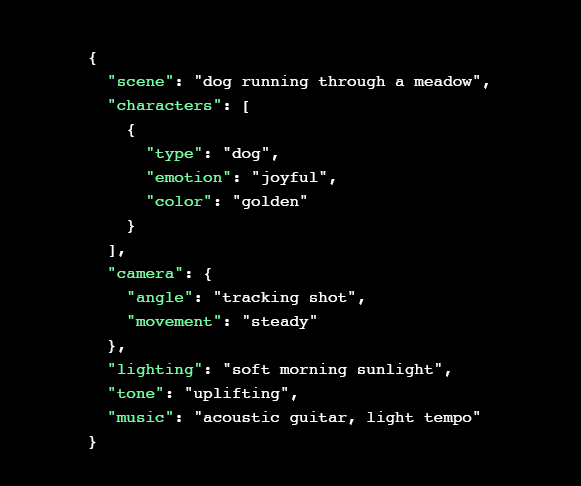
Instead of hoping VEO3 interprets “make it happy,” you’ve specified:
What’s in the scene (
dog running through a meadow)How it’s captured (
tracking shot,steady camera)Mood and feel (
soft morning sunlight,uplifting tone)Media parameters (
10s duration,acoustic guitar soundtrack)
Iterating with JSON
Let’s say you want a darker, cinematic version of the same video.
You don’t rewrite the entire prompt—you tweak a couple of fields:
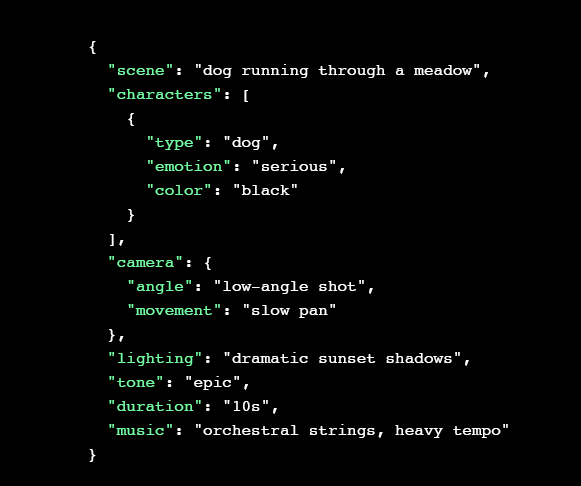
Notice the differences:
"color": "black"→ completely changes character feel."lighting": "dramatic sunset shadows"→ shifts the mood."music": "orchestral strings, heavy tempo"→ new emotional palette.
Everything else stays constant.
JSON as a Creative Workflow Tool
Rapid A/B testing: Save multiple prompt versions as
.jsonfiles and batch-generate.Collaboration-friendly: Editors, producers, and marketers can all edit the same JSON without needing to “speak prompt poetry.”
Automation-ready: JSON fits neatly into scripts, APIs, or content pipelines—enabling programmatic video generation.
Beyond Single Prompts: Storyboard-Level JSON
For longer-form videos, JSON can handle multi-scene structures:
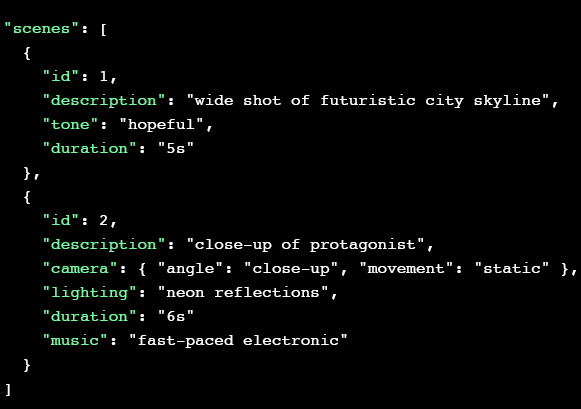
Of course, this example prompt is just a starting point—but with this method, you can achieve results that are both highly precise and infinitely scalable. The real key is experimentation: refining, adjusting, and iterating until you arrive at a structure that truly serves your creative purpose.
The Big Picture: Why Structured Prompts Matter
JSON prompting isn’t just a technical upgrade. It represents a philosophical shift:
From poetry to precision: No more vague adjectives; now, every choice is explicit.
From solo artistry to collaborative workflow: Teams can co-create and hand off structured templates.
From experimentation to repeatability: Once you’ve dialed in the perfect look, it’s codified in JSON forever.
Final Takeaway
For intermediate creators, JSON prompting in VEO3 means greater control, faster iterations, and workflows that scale. It’s not about replacing creativity—it’s about channeling it into a format AI can interpret consistently.
As VEO3 and other AI video tools mature, structured prompting is the bridge between imagination and precision, giving creators the power to design videos not just with words, but with data-driven intent.